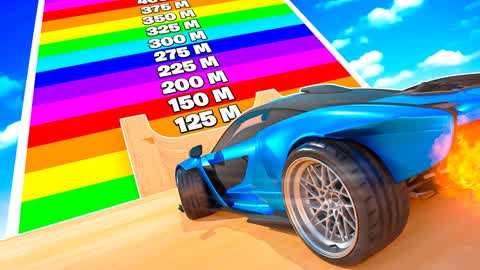
AVOID
CRAZY RAMP
by brogames
3791-0891-9328"Crazy Ramp is a Fortnite Creative map where players race custom vehicles, jump long distances, and level up to unlock new cosmetics."
What your child develops
What your child develops
Children can enjoy the thrill of racing and trying to reach the finish line, which may encourage perseverance. The custom vehicles and unlockable trails offer a sense of progression and reward.
What to watch out for
What to watch out for
The game features a leveling system and cosmetic unlocks which can create a desire for continuous play. With 'Users Interact' and 'In-Game Purchases' enabled, children may be exposed to conversations with strangers and prompted to spend money within the experience.
This experience is scored on 9 dimensions adapted from the 50-dimension Ludograph rubric. Risk category weights match the rubric (Compulsion-loop design 45%, Monetization 30%, Social 25%); per-category sub-items are aggregated into a single score.
Parents ask…
Is CRAZY RAMP safe for kids?
Ludograph gives CRAZY RAMP a rating of 27/100, recommended for ages 7 and up. Significant risks make this hard to recommend for younger players.
What age is CRAZY RAMP appropriate for?
Ludograph's rubric recommends a minimum age of 7+ for CRAZY RAMP on Fortnite Creative, based on content, social, and monetization risks.
How long should kids play CRAZY RAMP?
Our session recommendation for CRAZY RAMP is up to 30 minutes per day. It is derived from the experience's own structure (natural stopping points, compulsion-loop design, monetization pressure, and social dynamics), not from a universal screen-time dose.
Session recommendations are design-based heuristics. Evidence linking specific daily durations to child outcomes is limited, and context matters as much as time; treat this as a starting point for household rules, not a clinical threshold.
What are the main risks of CRAZY RAMP?
The game features a leveling system and cosmetic unlocks which can create a desire for continuous play. With 'Users Interact' and 'In-Game Purchases' enabled, children may be exposed to conversations with strangers and prompted to spend money within the experience.
Parent tip
Play with your child and discuss healthy limits for play time and in-game spending, focusing on having fun rather than just leveling up.
ℹFortnite parent guide▾
Bottom line first
Fortnite Battle Royale has unfiltered voice chat with strangers enabled by default. Go to Epic Games account settings → Parental Controls and disable voice chat, or set it to friends-only, before your child plays any online mode.
Fortnite is five different games in one launcher. Battle Royale, LEGO Fortnite, Festival, Rocket Racing, and Creative each have different age-appropriateness and risk profiles. Your child may start in LEGO Fortnite and drift into Battle Royale. Check which modes they're actually playing.
V-Bucks are the shared currency across all modes. The Battle Pass, cosmetic bundles, and in-map purchases all use V-Bucks. Many Creative maps surface V-Buck spending prompts. Set spending limits in Epic Games account settings or use a prepaid card with a fixed balance.
Creative map content can change after our rating. Each map is rated by our AI at a point in time, and creators can update maps. We recommend periodically checking which maps your child plays and watching a few minutes of gameplay with them.
Action: Epic Games account → Parental Controls → set a PIN, disable voice chat, and cap monthly V-Buck spending. Takes under 5 minutes and significantly reduces risk across all Fortnite modes.